Chapter One, Part A, Executive Computing
Welcome!
Welcome back! This post will explore some actual code from Executive Computng, Chapter 1.1 Again, I am a new Forth programmer, so this is only one way to do this.
Let’s start with inflationary growth
The first program on page 4 of Executive Computing (“EC” from now on) looks like this in BASIC.
10 LET S = 100
20 '
30 FOR Y = 1 TO 5
40    LET S = 1.15 * S
50    PRINT Y, S
60 NEXT Y
70 '
80 END
It calculates inflation over five years, assuming a 15% rate each year. It prints out each year and the corresponding amount. When run, you get this:
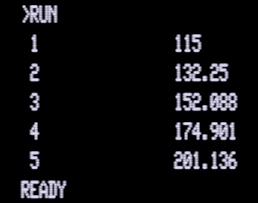
A similar program could be written in Tali Forth like this, following Leo Brodie’s example from Starting Forth: Throw it For a Loop. I’ve modified it slightly to put the headers at the top and to just do 5 years of calculations.
\ Plain percentage calculation
: % 100 */ ;
\ Rounded percentage calculation
: r% 10 */ 5 + 10 / ;
: compound ( amt int --)
    cr ." Year Balance" cr
    swap 6 1 do
        i . 2dup r% + 3 spaces dup .
    cr loop 2drop ;
The results are similar to the BASIC program (input in cents):
10000 15 compound
Year Balance
1    11500
2    13225
3    15209
4    17490
5    20114
 ok
However, there are significant differences. The BASIC version requires the use of
variables Y and S. The Forth program uses the stack and uses the
built-in variable i for the loop counter. Intermediate results
are saved back to the stack, rather than using a variable. Obviously, the
syntax of the loop command itself is different. Forth being Forth, we’ve
now created a new word compound, not just a program. You can try out
different initial values just by doing amount interest compound.
But the real issue for this type of “calculator-style” program, is the lack of floating point support in Forth compared to BASIC, as well as Forth’s type system. By default, non-string variables in early Microsoft BASICs by default used something called Microsoft Binary Format single-precision, an early floating point format, stored in 32 bits. This means that the TRS-80 program above will cheerfully accept very large numbers at the expense of accuracy.
There are good reasons not to use floating point (see the “Philosophy of Fixed Point” chapter in Starting Forth1), especially for processors without a numeric co-processor, and especially when CPUs ran at 1Mhz (my SBC runs at 12 times that speed). Accuracy is another reason. However, it means that we have to work around our training with calculators and other systems and languages that use floating point. So, in the code above, I’ve just entered the quantity in cents, rather than dollars. I just mentally insert the decimal point in the appropriate place when interpreting the results. Floating point is not the problem: range is. Things start to fall apart when we use a number close to 30000 ($300.00 if we are calculating in cents).
The reason is that we are using */, one of Forth’s scaling operators, to work
with the 15% growth each year. This takes the principal, multiplies it by the
percent number and then divides it by 100. It’s a very cool feature of Forth.
See the referenced chapter in Starting Forth for the details. Forth
essentially trades the ability to work with floating point numbers for the
ability to work with fractions.2
The big limitation with the */ operator is that it works with signed 16-bit
numbers. This means that the largest input number we can use is about 28,000,
because we will be above 32,000 by the end of the calculation. How do we work
around this? Well, we could give up precision, of course. Just don’t enter the
cents. Now we can work with numbers up to $28,000, in place of $280.
However, there is another option. We can use the other Forth scaling operator,
the “mixed scaling operator” m*/ which takes a signed double, multiplies it
by a signed 16-bit number, divides by a signed 16-bit number, and returns a
signed double. The rewritten code looks like this:
\ Amount as a double, interest rate as a single
: % ( d n - d) 100 m*/ ;
: compound ( amt_double int_single --)
    cr ." Year Balance" cr
    >r 6 1 do
        i . 2dup r@ % d+ 3 spaces 2dup d.
    cr loop r> drop 2drop ;
As you can see, the code got a bit more complicated, because we are now dealing with double numbers that take up 2 cells of storage and have to be handled accordingly. Also, we are putting the interest rate on the return stack to avoid having to do some fancy stack manipulation or (horrors) use a variable.
All of this is a reminder that, when using Forth, at least on a 65C02, we have
to be conscious of cell size and maximum integer size. We also have to be aware
of both the inputs and outputs to the words that we are using, not only signed
and unsigned, but also single vs. double. How big a number could we use in our
little program? Well, on the 65C02, The first thing the m*/ operator does is
a multiply by 15, and the maximum size for the multiply is a 32-bit
double-length signed number (2147483647). So, if we divide the maximum integer
size by 15 and then by 100 (because we are using cents for everything), the
biggest number we are capable of using as an input is 1,431,655. Of course, we
can dump the cents and do whole numbers up to 143,165,500.
This was a lot for just the very first little program in the EC book. Thanks for reading all the way through. Go build a 65C02 computer and run Tali Forth on it!
-
Nevison, J. M., (1981). Executive Computing–how to get it done on your own. Addison-Wesley Publishing Company, Inc. https://archive.org/details/executivecomputi00nevi/page/n1/mode/2up ↩↩
-
Modern Forths like gforth have floating point support, as well as support for the scaling operator, so win-win. ↩